Freshdesk; requests, tips & tricks, feedback

The CSMs had a discussion regarding certain issues we were having climatizing to Freshdesk, workarounds we found, and customizations we implemented to make our day to day to work easier. There may also be some global setup options or automatizations we can configure to further hasten our workflow.
Creating this discussion in order for everyone to share their experience and to capture feedback.
Comments
-
Priority Automation
It would be nice to be able to set up some automation, it seems like this is looked with the admins only for now .
For example, all my tickets seem to be set to low priority, not sure what logic is being used for that. I'd like to set it so that my largest customers are set to High right away, for example.
"Kanban board"
It sucks. Can't reply from there so not sure why it exists. I don't wanna look at my work, I wanna do my work ;)
0 -
Seeing your own custom filtered ticket views as a Kanban board was one of the better Happyfox features - has anyone figured out a way to combine the Kanban board and the filtered ticket view in FD?
0 -
Automation
I don't have a lot of access here. This will probably be something good to bring up at the next Team Awesome.
Kanban Board
That Kanban board is an addon that was only released by them in the last year or so. Seems like it has a lot of bugs still, but it's probably a feature they'll grow.
Filtered Views in Kanban
There are ways to customize what the Kanban board shows you.
Basic filters are here:

I find filtering by Group is the easiest thing for support. I imagine for CSMs, doing it per Agent is probably going to be easiest. It should be noted that you currently can't save filters here yet, so I would just find the simplest filter that works for you now, just so you can set it up fast if you accidentally reload the page.
And you can customize the columns by jumping into Configurations here:

And finding how you'd like to organize (it's organizes by different fields in the tickets):

For Support, the easiest best selection is 'Status.' Then, in the next bit, it's a simple matter of drag-and-dropping the columns you want displayed in the Kanban:

The columns will appear based on how your place the different fields with the leftmost being at the top and the rightmost being at the bottom.
The kanban view you make here does save, so you'll be able to jump back to it whenever - you just may have to adjust the filter to get the information you want.
0 -
One feature I really loved in Happyfox was that I could bcc myself on every reply, meaning that I would get a copy of my response in gmail in the same chain, which makes it a lot easier both for context, but also just for historical searching and 'did i reply to that already' type stuff.
if there is any way I am missing to bcc myself on my own replies, please let me now
0 -
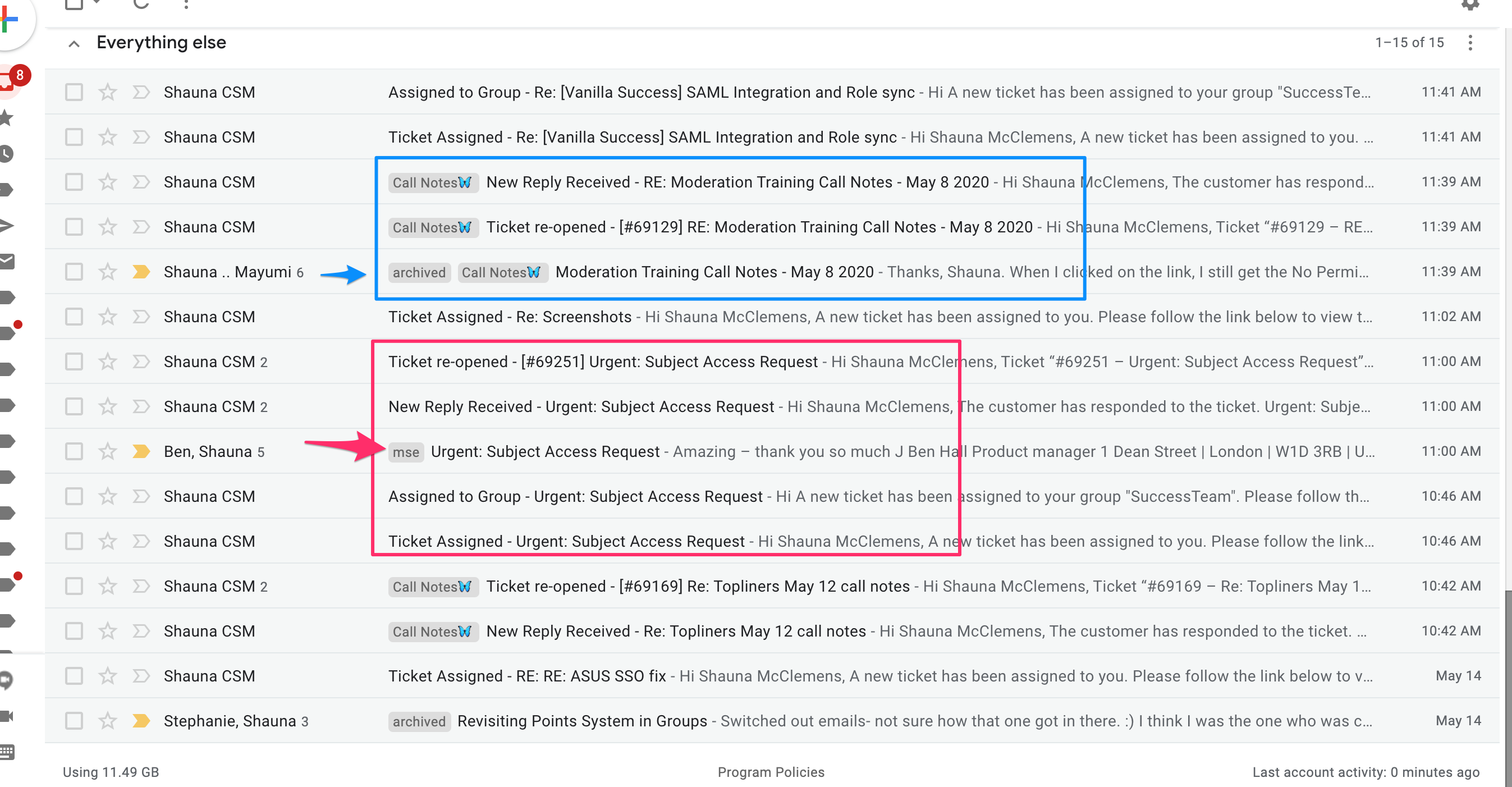
Is there any way to opt out of notifications for new reply received and ticket reopened? For my personal workflow, this is redundant as it's all the gmail email (marked with arrow) and look at my fresh desk throughout the day, I'm good with just the regular email.
 0
0 -
One feature I really loved in Happyfox was that I could bcc myself on every reply, meaning that I would get a copy of my response in gmail in the same chain, which makes it a lot easier both for context, but also just for historical searching and 'did i reply to that already' type stuff.
if there is any way I am missing to bcc myself on my own replies, please let me now
It should be on the right-side of the reply area.

Is that not functioning for you?
Is there any way to opt out of notifications for new reply received and ticket reopened? For my personal workflow, this is redundant as it's all the gmail email (marked with arrow) and look at my fresh desk throughout the day, I'm good with just the regular email.
It looks like most of those automated notifications are tied up in the admin dashboard (https://support.freshdesk.com/support/solutions/folders/272650). I think some of them have to be on because it's necessary for other teams' specific workflow. There might be a way to toggle it for individual users.
@Max , could you post the filters you're using in gmail currently? Until we the notifications 100% sorted, that might help other CSMs keep their mailbox from filling up too much with extra information.
0 -
Here is my filter:

note the minus "-" before my email and success, im basically saying, for all emails that have the subject 'assigned to group' EXCEPT for ones sent from my email or success' email, shut up
0 -
Ah, I see. According to their Support doc here (https://support.freshdesk.com/support/solutions/articles/225188-can-an-email-address-be-automatically-added-in-the-bcc-for-replies- ), that seems possible, but it's something that would need to be checked into through the Admin dashboard (to see if it can be set up for individuals).
I'll probably have a very important work meeting with Laura tonight or tomorrow - I'll see if she can give me temporary admin access to try to fast-track some of these issues myself.
1 -
>Is there any way to opt out of notifications for new reply received and ticket reopened? For my personal workflow, this is redundant as it's all the gmail email (marked with arrow) and look at my fresh desk throughout the day, I'm good with just the regular email.
It looks like most of those automated notifications are tied up in the admin dashboard (https://support.freshdesk.com/support/solutions/folders/272650). I think some of them have to be on because it's necessary for other teams' specific workflow. There might be a way to toggle it for individual users.
It would be nice to be able to do this, got a few folks whining in my inbox about this this morning
0 -
It would also be nice if links opened in a new tab. I know I can right click, but I am old and set in my ways. Personally, 99% of the time if im clicking the link in a ticket, i still need to come back to the ticket, so a new tab is ideal
1 -
It would also be nice if links opened in a new tab. I know I can right click, but I am old and set in my ways. Personally, 99% of the time if im clicking the link in a ticket, i still need to come back to the ticket, so a new tab is ideal
So these very small issues are things that I can raise in their support queue but are very unlikely to see any changes, this is one of the downsides of going with this larger provider.
If you have a mouse with a wheel though, add middle clicking to your workflow. It'll make your life easier and its standard in every browser I've used. Command+click also works for this if you work with your touchpad. Middle clicking is the easiest one to form a habit of, in my opinion.
One feature I really loved in Happyfox was that I could bcc myself on every reply, meaning that I would get a copy of my response in gmail in the same chain, which makes it a lot easier both for context, but also just for historical searching and 'did i reply to that already' type stuff.
if there is any way I am missing to bcc myself on my own replies, please let me now
I can set up your ticket assignment automation to forward the email to a particular address, but this would send a single email upon assignment. I can make the rule add an address as a CC, but not a BCC. Would either of those work?
0 -
Freshdesk has a beta going for new out of office functions, Heres the email:
Hi Laura,
We've enabled agents shifts and out of office for your Freshdesk. You should see the feature under Admin --> Agent shifts.
Since this is in early access, I'll be able to add this to your account. However, this will be enabled in GA only for the Forest plan. I can have your account manager get in touch with you about how to handle this post EAP.
Agents in your account who have the ability to set their availability status, will also see the ability to schedule their out of office duration under their availability settings like so:
You'll also see the new condition to check the availability of your agents in your automations:
Do give the feature a spin, in setting them up in your account. I'm sure that you'll run into a lot of questions about the functionalities.
I'd love to setup a call with you after you've given it a spin to hear about your experience and any questions you might have. So feel free to write back with open time slots and we can have a quick chat about how you use agent shifts.
If you don't see the new feature yet, do a hard refresh of your browser (CMD+Shift+R if you use a mac, CTRL+Shift+R if you're on windows) and you should see the new features right away.
Do let me know if you have any other questions!
Regards,
Chara
If we made some automations around OOO statuses, what would the CSMs be looking for? Where should the emails go, and what sort of message should be sent to the clients?
0 -
Is it intentional that clients are getting fresh desk 'so and so commented on' emails?
I had assumed (perhaps stupidly) that when I replied they would only get my reply:
feedback from nextdoor
I'm sure you have heard this a 1000 times by now but on the off chance you haven't, a quick message to let you know that your new email system is crazy.
Every time I send you email, or someone I'm on a thread with you sends you email, we get the email sent by me or the other person plus a notification like the one below (which just repeats the same text we already received in the previous email). It's pretty annoying.
Does your team understand this? It seems strange to me that it's something you're continuing to do.
Basically, if there are 5 customers on a chain and 1 replies all, fresh desk seems to send them a dup --- this copy is being sent to Gordon, as if it's from me, but is really the comment from Doris that is being resent to everyone on the chain
(ticket https://vanilla.freshdesk.com/a/tickets/72811)
From: Shauna CSM <shauna.csm@vanillaforums.com>
Date: Thu, Jun 18, 2020 at 6:58 AM
Subject: New comment - [#72811] Notifications from emails
To: <akennedy@nextdoor.com>, <gordon@nextdoor.com>, <kmiller@nextdoor.com>, <sdesouza@nextdoor.com>
Cc: <eharris@nextdoor.com>
There is a new comment in the ticket submitted by Sophie De Souza to Vanilla Forums
Comment added by : Doris Raja
Comment Content:
Hi Gordon and Shauna,
Thanks for flagging it, we will check again the settings.
Have a nice day,
Doris
0 -
Hey @Laura
When cleaning out the success inbox, I always see a bunch of support issues that I believe are trying to tell Saad's email that someone on the csm team has a reply on one of their support tickets

anyway to disable that? just annoying to close em out regularly if we can filter those out somehow?
0 -
here is an example of one: https://vanilla.freshdesk.com/a/tickets/74946
0 -
I removed Saads group associations, which should stop those emails. Let me know if they continue.
0


